
Recipe Builder Mash Type selections: What do they do?

Mallonee's Malt

New Member
Premium Member
Established Member
Joined
May 7, 2019
Messages
15
Reaction score
8
Points
3
I'm trying to adapt my new Christmas toy - a BeerMKR into the recipe builder.

It's an interesting and clever device but it combines some brewing steps and puts process breakpoints in different places.

As nearly as I can model it the mashing step is basically the same as BIAB. It brings water temperature in the grain (slowly) up to about 160F and then drops it back to do mashing and Pasteurization. No boil.
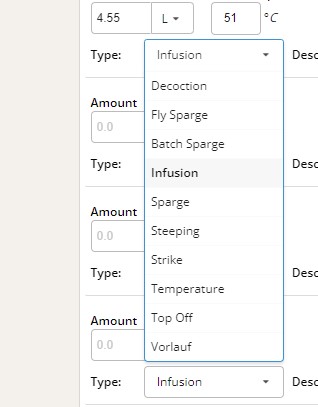
RecipeBuilderMashTypeChoices.jpg


My question is: How do all of the options in the mashing schedule affect the math and process?

What is a "temperature mash" procedurally and how does that affect the calculations? There may already be a mash process listed here that does what I need it to do, but I can't find any documentation on what happens and what is assumed if you select one or another option. I saw a reference that the recipe builder "knows" that a decoction doesn't add water.

And seriously, what calculation is there for Vorlauf?
 
I'm trying to adapt my new Christmas toy - a BeerMKR into the recipe builder.

It's an interesting and clever device but it combines some brewing steps and puts process breakpoints in different places.

As nearly as I can model it the mashing step is basically the same as BIAB. It brings water temperature in the grain (slowly) up to about 160F and then drops it back to do mashing and Pasteurization. No boil.

View attachment 19153

My question is: How do all of the options in the mashing schedule affect the math and process?

What is a "temperature mash" procedurally and how does that affect the calculations? There may already be a mash process listed here that does what I need it to do, but I can't find any documentation on what happens and what is assumed if you select one or another option. I saw a reference that the recipe builder "knows" that a decoction doesn't add water.

And seriously, what calculation is there for Vorlauf?

It sounds like you do a temperature AND infusion, sort of. You can use Strike or infusion for your step so that you can get the water amount correct. For vorlauf, that is a mash step but it's in the instructions and not an infusion.
 
To add a little more, we do have an update planned/coming that will hopefully clarify what each step does as well as clean up the list of steps.
 
To add a little more, we do have an update planned/coming that will hopefully clarify what each step does as well as clean up the list of steps.

Oh, thanks. I think I finally realized that some of those were for brewday instructions.
Yes explanation for where the different mash step affect the math would be appreciated.

I'm coming to the conclusion that BeerMKR is a different model that forces some different steps. Fun, though. I've already brewed more batches this calendar year than I did the last two years combined and I'm about to embark on a specific recipe refinement because of it.
 
@Pricelessbrewing Did that update ever happen? I still can't find what the different items in the dropdown actually do nor can I find why I would select a particular one.
 
I wasn't aware any of them did anything. I thought it was all just for personal reference and to auto-edit the brewday steps.

Now, if you could specify a 'boil-off' rate for decoctions, input how much you are decocting, for how long, and have it tell you how much water you need to add, that would be sweet! (even better if it could estimate changes in color & fermentability, but I'm sure that's asking for the Moon)

I don't know how much hard data is out there to develop formulas for adjusting fermentability based on mash temps. If they do exist, and they could be incorporated or triggered by the mash steps, that would be fantastic. (again, quite a big ask, I'm sure.)
 
I'm pretty sure the different dropdowns change calculations somewhere. An infusion is expecting you to add water. I'm developing a recipe for someone with a grainfather so that is going to be a temperature change during the mash. I suppose heating with a HERMS system would be similar (both adding heat though methods are different). I do think some of those are just tags (and thus have no effect on the calculation).

What I'm looking for is a description of what each does and why it would be selected. It should be in the documentation somewhere.
 
I'm pretty sure the different dropdowns change calculations somewhere. An infusion is expecting you to add water. I'm developing a recipe for someone with a grainfather so that is going to be a temperature change during the mash. I suppose heating with a HERMS system would be similar (both adding heat though methods are different). I do think some of those are just tags (and thus have no effect on the calculation).

What I'm looking for is a description of what each does and why it would be selected. It should be in the documentation somewhere.

I'm not sure what your question really is, but using a temperature step is there of course. Does this help at all: https://docs.brewersfriend.com/recipe-builder/recipe-setup
 
I did look at those instructions. Mostly they are very good.
In the mash section there isn't any mention of why there is such a selection of "Type" values in the dropdown box.

The most useful thing on the page is this paragraph:
Given the wide variation in mash processes, equipment, yeast strains, and fermentation temperatures, the mash temperatures do not factor into the estimated FG of the recipe. What you can to do adjust FG is change the yeast attenuation.

I am interpreting that paragraph to say that I was wrong when I was assuming that changing the dropdown type changed calculations.

So the question is: Why do I pick any particular type in the dropdown box?
And the reason for the question is that I'm trying to adapt the mashing steps to most closely match my equipment and process. In my case this probably most resembles BIAB without sparge but with slowly stepped mashes. Maybe my heat rate is too slow for stepping to really matter but I'm trying to figure out how to encode those steps in the recipe. Without a decoder ring for the types I don't know that what I'm using is correct.
 
I did look at those instructions. Mostly they are very good.
In the mash section there isn't any mention of why there is such a selection of "Type" values in the dropdown box.

The most useful thing on the page is this paragraph:


I am interpreting that paragraph to say that I was wrong when I was assuming that changing the dropdown type changed calculations.

So the question is: Why do I pick any particular type in the dropdown box?
And the reason for the question is that I'm trying to adapt the mashing steps to most closely match my equipment and process. In my case this probably most resembles BIAB without sparge but with slowly stepped mashes. Maybe my heat rate is too slow for stepping to really matter but I'm trying to figure out how to encode those steps in the recipe. Without a decoder ring for the types I don't know that what I'm using is correct.

The type of mash helps calculate the water volume, as extract is different than all grain and partial mash with mash calculations.

If you want to be specific (step mash via infusion or temperature), the ‘mash quidelines are where that is done.
 
I'm really not trying to be a dick here, but I just don't get it.

The entirety of the text under "Mash guidelines is this:

How does the Mash Guidelines box work in the recipe editor?​

The mash guidelines section is the place to provide temperatures and times for the mash process. Volumes are optional. For all grain recipes, an optional starting mash thickness field appears (normally between 1.0-2.0 qt/lb or 2.0-4.0 L/kg).Given the wide variation in mash processes, equipment, yeast strains, and fermentation temperatures, the mash temperatures do not factor into the estimated FG of the recipe. What you can to do adjust FG is change the yeast attenuation.The Brew feature is where mash thickness, infusion temperatures, and water volumes are tracked. Here is our approach to mashing:On the recipe page, enter temperatures, times, and rough amounts. The fields are all optional. From there, save the recipe, then click the 'brew' button. The system then uses your equipment profile to figure out exactly how much water your will need for the mash. (You can setup your equipment profile under the gear icon in the upper right.) Then go into the brew feature's Mash Calculator tab. From there you can adjust the mash ratio, grain temp, mash temp, and do infusions, etc. It saves every detail along the way. It also helps zero in on the target water volume for the brew.

These are all the choices in the dropdown box
1764570533451.png


So I'm really not seeing the explanations in "Mash Guidelines" that would guide me as to what dropdown to use.

Unless the answer is that "It doesn't matter, those are just labels for you..." and that nothing affects the recipe. If that's the case it would be appreciated in the mash guidelines for it to say that they are just labels.
 
I'm really not trying to be a dick here, but I just don't get it.

The entirety of the text under "Mash guidelines is this:


These are all the choices in the dropdown box
View attachment 33629

So I'm really not seeing the explanations in "Mash Guidelines" that would guide me as to what dropdown to use.

Unless the answer is that "It doesn't matter, those are just labels for you..." and that nothing affects the recipe. If that's the case it would be appreciated in the mash guidelines for it to say that they are just labels.

It truly just doesn’t matter. It helps YOU because it pulls into the brew steps and labels things for you. You can use the ‘quick water requirements’ via the hamburger menu to fill in the volumes and that also pulls into your water calculator, brew steps, brew sessions, etc.
 

Back
Top