Recipe Statistics Always Green / Within Style

JIm S.

New Member
Premium Member
Joined
Mar 18, 2026
Messages
5
Reaction score
3
Points
3
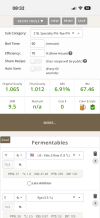
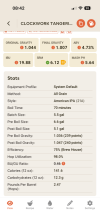
I understand the recipe editor statistics (near top of editor screen) are GREEN when recipe is within style range and RED when not.

My recipe values change but remain GREEN regardless of how out of range the recipe is (e.g., 100 lbs grain added to 5 gallon batch = 100% ABV).

Logged in/out. Tried Edge & Chrome browsers. Cleared browser histories. No custom ingredients - all from pull down menus. Reloaded recipe beer style. Tried different recipes.

Am I missing something here? Thanks!

 
Welcome to Brewers Friend!

I suspect you refer to the green text at top, which is just that - green text, always. It's not an indicator of anything.

1777586863082.png


If THAT is what you mean, switch to EDIT view, them at the right side of that green text area, click "Mode" to open a drop-down that'll show you what it thinks of your recipe's adherence to style.

If I have this all wrong: Can you 'share' the recipe (make it public) and a link to it?
 
I thought he meant the style icon in the edit mode is red
it will be green if it matches the style red if not
not sure why it never changes
not quite sure I understand
 
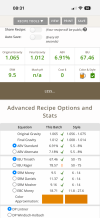
Either while creating a new recipe or editing a recipe you click the ‘More’ button. This will show you if you are within style guidelines
 

Attachments

  • IMG_1100.png
    IMG_1100.png
    110.4 KB · Views: 7
  • IMG_1099.png
    IMG_1099.png
    136 KB · Views: 7
Not sure, getting old, but I thought when viewing a recipe the ‘More’ button was there in a previous software version :cool:

Maybe a feature request
 
In the app it will show when you are off the guidelines, if you click the red ‘!’ it will show you where you are off
 

Attachments

  • IMG_1101.png
    IMG_1101.png
    131.6 KB · Views: 7
Donoroto's screen shot is the Stats Bar (OG, FG, ABV, etc.) I was referring to.

I thought I remembered the Stats Bar values changing when the recipe was out of style? This was supported by the following Brewers Friend cited web information:
-----------------
"in the Brewer's Friend recipe editor, statistics (OG, FG, ABV, IBU, SRM) turn red when they fall outside the selected style guidelines.
  • Green: The value is within the accept able range for the chosen style.
  • Yellow/Red: The value is borderline or out of range, respectively."
---------------
Yes, expanding the Style/Statistics menu using the More (not Mode) button shows numerical stats and exclamation points when out of range.

Admittedly, my B-Friend wish list would be a graphics bar showing a style's range and where the recipe is in relation (like most other Apps have).

Thanks for the help!
 
@Yooper the above cited web information should be checked and, if needed, corrected.

Thanks @JIm S. for pointing that out.
 
Donoroto's screen shot is the Stats Bar (OG, FG, ABV, etc.) I was referring to.

I thought I remembered the Stats Bar values changing when the recipe was out of style? This was supported by the following Brewers Friend cited web information:
-----------------
"in the Brewer's Friend recipe editor, statistics (OG, FG, ABV, IBU, SRM) turn red when they fall outside the selected style guidelines.
  • Green: The value is within the accept able range for the chosen style.
  • Yellow/Red: The value is borderline or out of range, respectively."
---------------
Yes, expanding the Style/Statistics menu using the More (not Mode) button shows numerical stats and exclamation points when out of range.

Admittedly, my B-Friend wish list would be a graphics bar showing a style's range and where the recipe is in relation (like most other Apps have).

Thanks for the help!

Thanks for reporting this. We’ve just pushed out a fix, and it should be live soon. Please let me know if you have any further issues.
 

Back
Top